Designing safe production AI agents via tool scoping: the outreach agent use-case
It’s tempting to build an “agent” by handing it every tool it might need: a browser, a search API, an email client, and maybe even direct database access. For a demo, it can feel like magic. But in production, it’s a liability.
At Mint Security, we built an Outreach Agent: an AI system that investigates a SaaS product and, when needed, communicates with the outside world.
The purpose is to address a set of security and privacy questions that are frequently unclear or absent from public documentation. These may include whether customer data is used for training or whether opt out options exist. In many cases, the answers can be inferred from a privacy policy or trust center. When they cannot, the practical solution is to contact the vendor’s privacy or security team directly.
That escalation is where the real riskemerges. Once an agent is able to send external emails, errors are no longer confined to internal reasoning but become outward facing actions. In this blog, we explore this case study in depth and explain how we mitigate the associated risks by carefully scaffolding agentic tools with clearly defined access scopes.
A case study - Outreach Agent
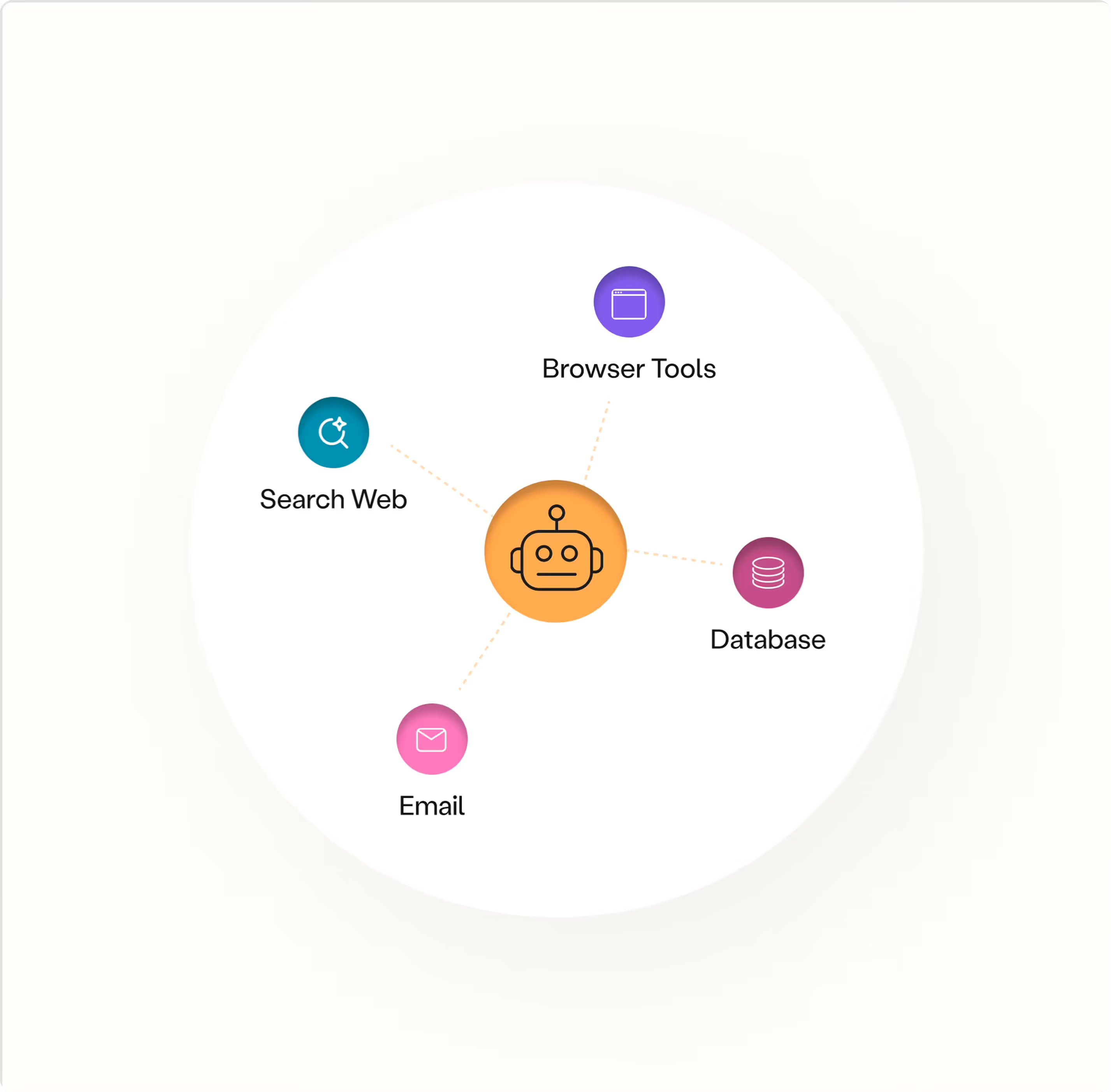
An agent that roams the net, communicates with external actors, with two entrypoints:
- New investigation: start from a product name and instructions.
- Inbound email continuation: when a vendor replies, continue the same investigation thread.
And it needs several capabilities buckets:
- Search web for relevant policy text
- Send and receive e-mails externally
- Escalate to a human operator
- Write results and store in a database
- Browser use for complicated actions
Where risk enters: external email
The agent processes untrusted external content, including web pages, PDFs, and inbound emails, while also holding a privileged capability: the ability to send outbound email in your organization’s name. When these two elements are combined, the failure mode is no longer limited to generating incorrect text. It becomes the possibility of sending an unintended email to the wrong recipient, with the wrong content, at the wrong time, along with any downstream consequences that follow.
Threat model: untrusted inputs + privileged actions
At a high level, we assume:
- Everything the agent reads from outside is untrusted (web content and inbound email included).
- The agent will sometimes be wrong or overly eager.
- The system must prevent “wrong” from turning into “catastrophic.”
We want the agent to be useful even when it misinterprets something, and we want failures to degrade into “no action taken” rather than “action taken badly.”
Design principle: scope capabilities, not prompts
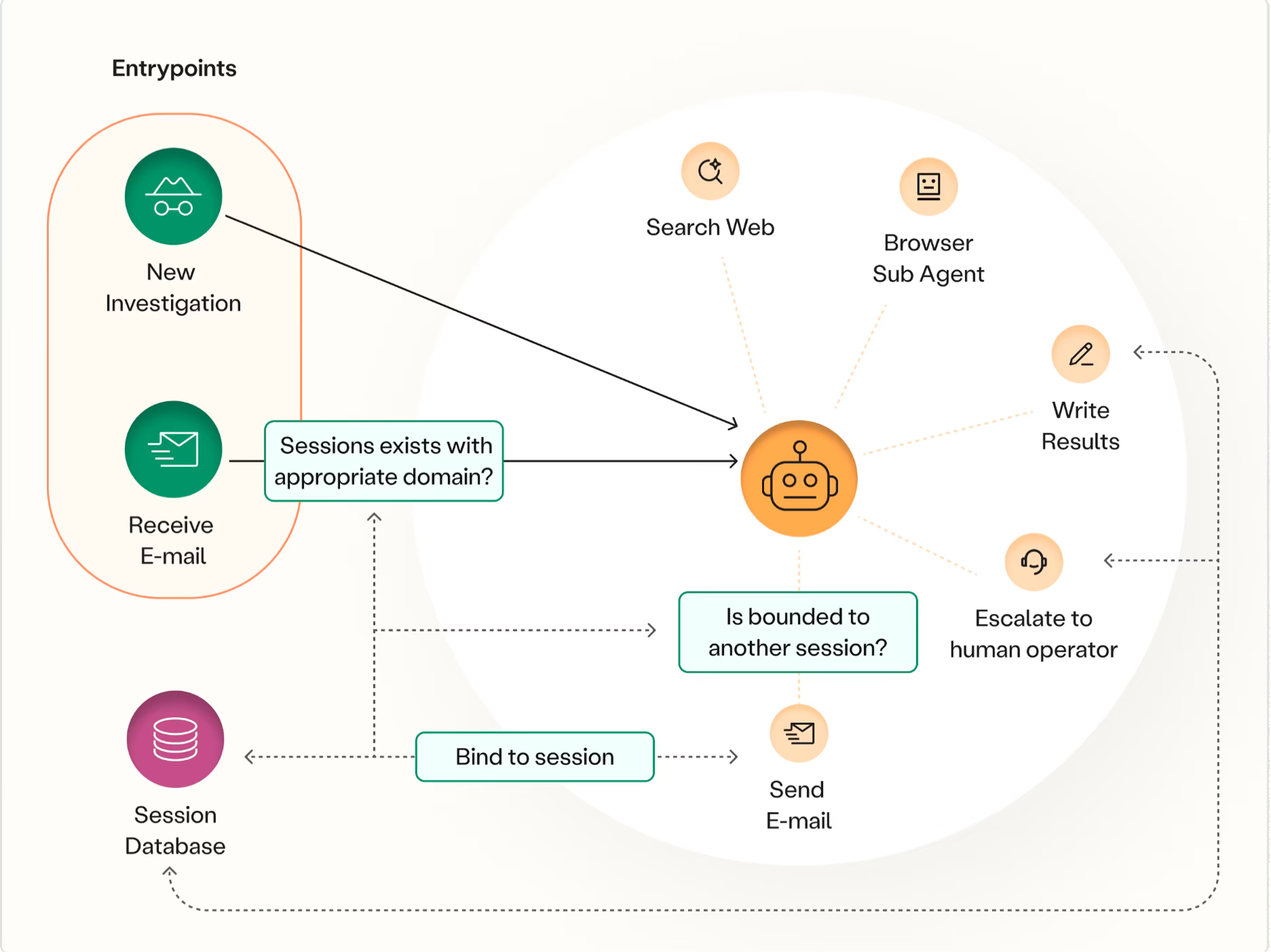
We don’t rely on prompts alone to keep the agent safe. Instead, we design the system so the agent never gets “raw” access to sharp tools. The core pattern is tool scoping:
- Replace powerful tools (“send an email to anyone”) with narrow, policy-checked actions (“send an email that satisfies these constraints for this investigation session”).
- Persist key constraints (e.g., which domain we’re talking to) in a session registry so enforcement is system-driven, not memory-driven.
- Separate capabilities so the component most exposed to untrusted content (browser use) cannot directly perform highly-privileged actions, such as external communication.
In the following we go into these components in more detail.
Limiting the Blast Radius of an LLM-controlled Email Tool
We do not give the agent a raw send_email(to, subject, body) tool. We provide a gated wrapper that mediates all outbound email - vendor outreach and escalation to a human operator.
The wrapper enforces a few simple invariants:
- Validate Basic structure checks: required fields, recipient format, size limits, etc.
- Bind the session to a domain
- If this is the first outbound email in the investigation, the system establishes the allowed domain(s) for the session (typically derived from the vendor’s known domain/trust center).
- If this is a follow-up, the recipient domain must match the session’s already-registered domain(s).
This transforms outreach into a controlled, threaded conversation rather than an unrestricted broadcast channel.
- Send through the gate
Only after checks pass does the wrapper send. The agent never receives email credentials and cannot bypass the wrapper. - Register, audit, stop
After sending, we write a record to the session registry (domains contacted, timestamps, message ids, rationale), and terminate the run. Stopping after send prevents the agent from chaining follow-ups in the same loop.
How to scope tools in practice?
Tool scoping can be implemented directly by wrapping tool functions. To illustrate, we can demonstrate how to achieve this using hooks. Hooks provide a powerful pattern for controlling how primitive agent events, such as tool calls, are intercepted before or after execution. In the Claude Code SDK, a recently popular framework for building agents, this can be implemented as follows.
SEND_EMAIL = "mcp__my-tools__send_email"

async def log_sent_email(hook_input, tool_use_id, context):
    """PostToolUse: persist outbound email sends for audit + session continuity."""
    if hook_input.get("tool_name") != SEND_EMAIL: return {}

    tool_in  = hook_input.get("tool_input", {})
    tool_out = hook_input.get("tool_response", {})
    session_id = hook_input.get("session_id")
    recipient  = tool_in.get("email_address")
    message_id = tool_out.get("message_id")

    if not (session_id and recipient and message_id):
        return {}

    enforce_email_policy(session_id, recipient)
    register_to_session(session_id, recipient, message_id, tool_use_id)
    return {}

mcp_server = create_sdk_mcp_server(
    name="my-tools",
    tools=[send_email],
)

options = ClaudeAgentOptions(
    model="claude-opus-4-6",
    mcp_servers={"my-tools": mcp_server},

    # Only the scoped email tool is exposed to the agent.
    allowed_tools=[SEND_EMAIL],

    hooks={"PostToolUse": [HookMatcher(hooks=[log_sent_email])]},
Isolating Browser Capabilities with Subagent Architecture
Browsing is where the agent is most exposed to untrusted content. So we isolate it.
We run “browser use” as a subagent with its own permissions:
- It can browse, extract text, and return notes.
- It cannot send email.
- It cannot write an investigation state directly.
This yields a cleaner boundary: the component most likely to encounter adversarial or misleading content is structurally unable to take the most sensitive action. To make it even more robust, it is possible to define that this component returns simple outputs, e.g. success = True/False.
Inbound email: session binding
Inbound email is the second entry point, and we treat it as untrusted continuation input. Our guiding rule is simple: an inbound message may continue an existing investigation only if the sender’s domain matches the session’s domain binding recorded in the registry. If it does not, the message is rejected.
Summary and takeaways
Risk emerges the moment an outreach agent gains the ability to communicate with the outside world. Browsing the web is messy; vendors reply with unpredictable content; models sometimes get eager. You don’t eliminate that with a better prompt. You contain it by constraining the blast radius.
What worked for us:
- Treat all external inputs as untrusted by default, including web content and inbound email.
- Place outbound email behind a mediated wrapper that strictly constrains its use.
- Bind each outreach effort to a session anchored in a system enforced domain registry.
- Explicitly deny email privileges to the browsing component.
- Terminate execution after sending to prevent cascading chains of activity
If you are building an outreach agent, embed safety into the system architecture from the start.
References
Design Patterns for Securing LLM Agents against Prompt Injections https://arxiv.org/abs/2506.08837
Not what you’ve signed up for: Compromising Real-World LLM-Integrated Applications with Indirect Prompt Injection https://arxiv.org/abs/2302.12173