

Executive summary
Three vendors now ship managed agent platforms aimed at the same enterprise buyer: Anthropic Claude Managed Agents, OpenAI ChatGPT Workspace Agents, and Google Gemini Enterprise Agent Platform. They are trying to solve the same problem (agents that can do real work, with real credentials, against real systems), but their documented security boundaries are not the same shape.
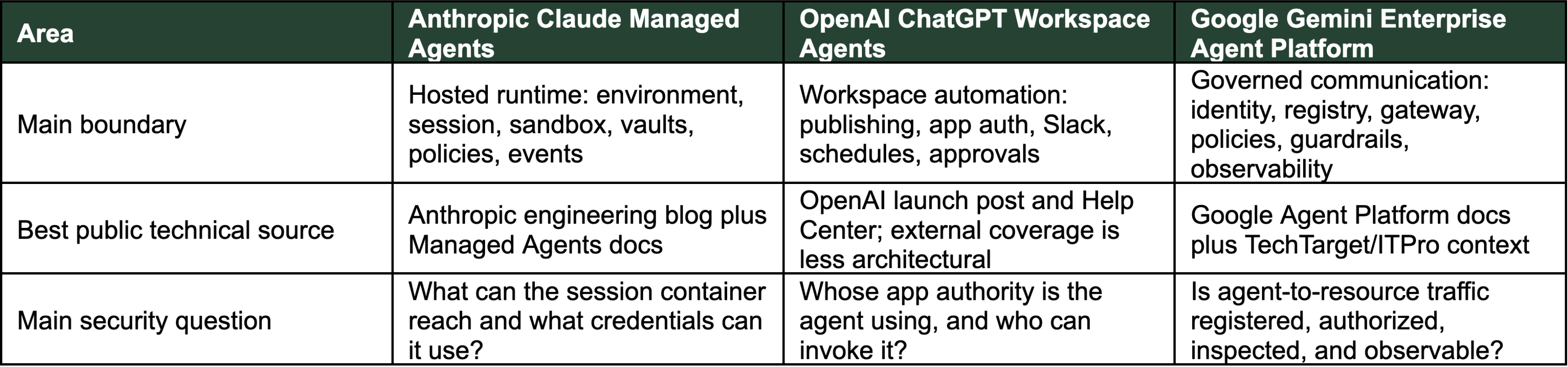
This audit walks each vendor’s public docs and asks the question a security team will eventually have to answer: what can this agent reach, whose authority is it using, and what evidence does it leave behind? It is a comparison of documented control planes, not a ranking of model safety. Table 1 below summarizes the three platforms at a glance; the bullets and the rest of the audit unpack each row.
- Anthropic publishes the most architectural detail. The engineering blog separates Sessions, harness, and sandbox as a deliberate security boundary; the docs cover Environments, per-session containers, networking modes, Vaults, Permission policies, Memory stores, and events.
- OpenAI documents the workspace and admin surface in depth: schedules, app-auth modes, write-action approvals, RBAC, analytics, Compliance API. But it says comparatively little about the runtime sandbox or low-level network egress.
- Google has the most formalized governance vocabulary: Agent Identity, Agent Registry, Agent Gateway, IAM policies, Model Armor, Semantic Governance, Code Execution, Observability. Several of those are still in Preview or Private Preview, which a security buyer needs to know before planning around them [12][14][16][18].
Key comparison
AreaAnthropic Claude Managed Agents OpenAI ChatGPT Workspace Agents Google Gemini Enterprise Agent Platform Main boundary Hosted runtime: environment, session, sandbox, vaults, policies, events Workspace automation: publishing, app auth, Slack, schedules, approvalsGoverned communication: identity, registry, gateway, policies, guardrails, observability Best public technical source Anthropic engineering blog plus Managed Agents docsOpenAI launch post and Help Center; external coverage is less architectural Google Agent Platform docs plus TechTarget/ITPro context Main security question: What can the session container reach and what credentials can it use? Whose app authority is the agent using, and who can invoke it? Is agent-to-resource traffic registered, authorized, inspected, and observable?
Platform anatomy: what are we actually reviewing?
The three platforms solve a similar enterprise problem, but they expose different operating models: a hosted runtime, a workspace automation surface, and a lifecycle/governance platform. The vendors agree that useful enterprise agents need somewhere to run, a way to hold credentials, a way to connect to tools, a record of what happened, and a control plane an admin can actually use. Where they disagree is which of those problems to solve first. Figure 1 places the three control planes side by side; the rest of this section walks each one as a product object before the audit gets to specific controls.
Anthropic
Claude Managed Agents are a hosted runtime. The public model is built around agents, environments, sessions, and events. An agent defines the model, prompt, tools, MCP servers, and skills; an environment is the configured cloud container template; a session is a running agent instance inside that environment; and events are the application-to-agent stream. The engineering architecture adds a useful security view: the session is the durable log, the harness orchestrates Claude and tool calls, and the sandbox is where generated code and file operations execute. That is why the Claude audit starts with environment lifecycle, per-session container isolation, network mode, vault references, permission policies, memory stores, and event visibility [1][2][3][4].
OpenAI
ChatGPT Workspace Agents are a workspace automation surface. Workspace Agents live inside the ChatGPT workspace rather than a separately exposed runtime object model. A user can create an agent from a prompt, template, or blank builder; test it before publishing; add apps, tools, files, skills, or custom MCPs; choose whether it is private, link-shared, or published in the organization directory; run it from ChatGPT; schedule it; or make it available in Slack. The security surface is therefore workspace delegation: who can build, who can publish, who can invoke, which apps use end-user versus agent-owned authentication, whether Slack expands the trigger surface, and whether write actions remain approval-gated [7][8][9].
Gemini Enterprise Agent Platform is a lifecycle and governance platform. Google describes Agent Platform around four phases: Build, Scale, Govern, and Optimize. Build covers no-code/low-code and code-based agent development; Scale covers runtime, sessions, memory, and Code Execution; Govern covers Agent Identity, Agent Registry, Agent Gateway, IAM policies, Model Armor, and Semantic Governance; and Optimize covers observability, evaluation, traces, logs, metrics, and operational views. Gemini Enterprise also provides centralized oversight for agents used by an organization, including Google-built, third-party, and internally built agents. That is why the Gemini audit centers on whether agents, tools, MCP servers, and endpoints are registered, authorized, inspected, and observable through the documented governance layer [12][13][14][15][16][18].
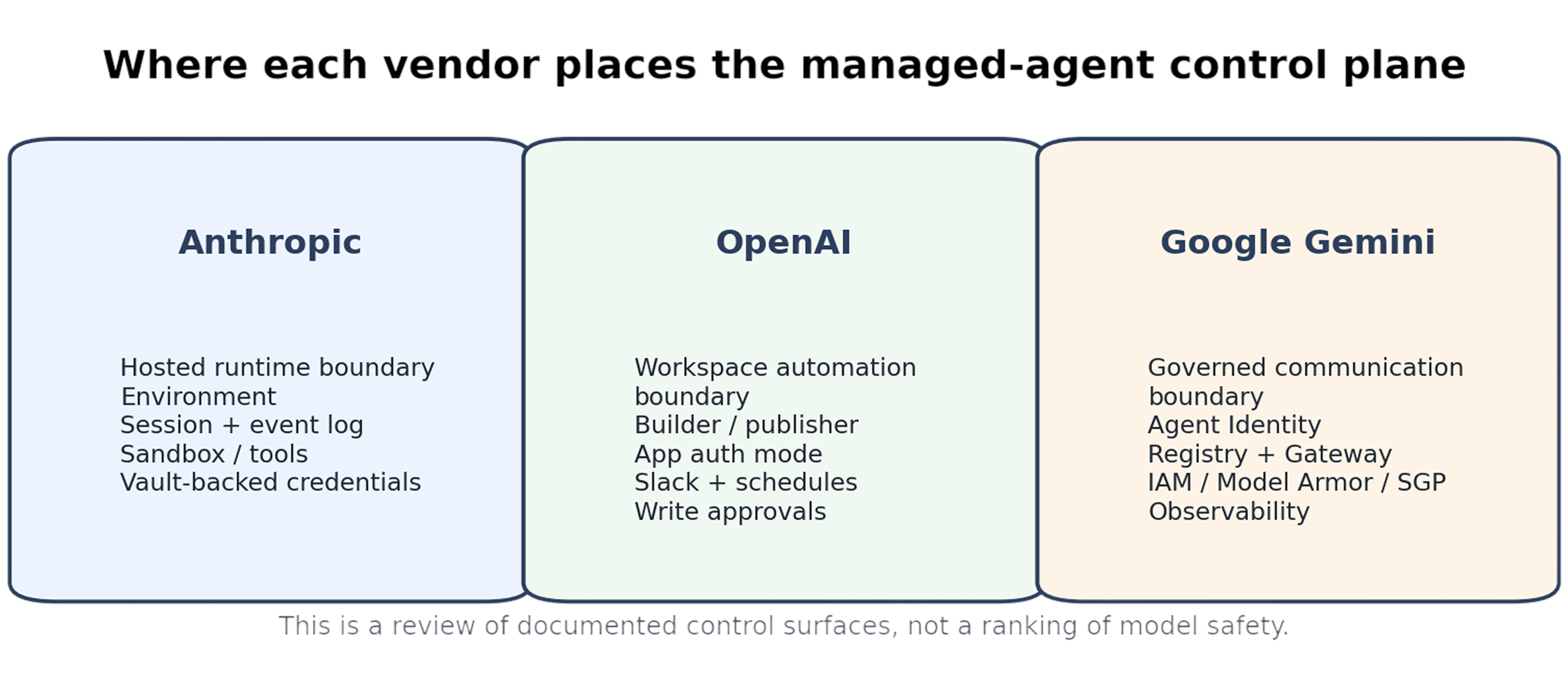
Figure 1. Each platform exposes a different managed-agent control plane: runtime, workspace automation, or governed agent communication.
1. Sandboxing and runtime isolation
Sandboxing is the first place where the platforms diverge.
Anthropic
Anthropic has the clearest public managed-runtime story. Managed Agents use Environments that define the container configuration where Sessions run. Multiple sessions can reference the same environment, but each session gets its own isolated container instance and sessions do not share filesystem state [3].
Anthropic’s engineering post adds the architectural reason this matters: the platform separates the “brain” and harness from the “hands,” including sandboxes and tools. In its security-boundary discussion, Anthropic says the structural fix was to ensure tokens are never reachable from the sandbox where generated code runs [1].
The boundary is implemented through two patterns. The harness calls the sandbox through a single interface, execute(name, input) → string, rather than running inside it. For Git-backed work, the repo’s access token clones the repo at sandbox initialization and is wired into the local git remote, so push and pull work without the agent handling the token. For custom MCP tools, OAuth tokens are stored in a vault and fetched by a dedicated proxy that holds a session-bound token and exchanges it for the credential; Anthropic states the harness is “never made aware of any credentials” [1]. One operational caveat from the docs: environments are not versioned, so customers are expected to track environment changes themselves to map state back to sessions [3].
OpenAI
OpenAI Workspace Agents are documented as cloud-running agents with access to files, code, tools, and memory [7]. The public Workspace Agents docs reviewed here emphasize workspace controls, app connections, Slack, schedules, approvals, analytics, and admin visibility rather than a formal sandbox boundary. One adjacent fact is worth stating explicitly: OpenAI’s Codex enterprise admin documentation says Codex cloud agents default to no internet access at runtime to mitigate prompt injection [22]. Workspace Agents are powered by Codex, but the Workspace Agents docs do not restate this guarantee for Workspace Agent runs, so the runtime egress posture for a Workspace Agent specifically is not publicly detailed in the reviewed sources.
Google documents explicit sandboxing under Code Execution. Code Execution lets agents run code in a secure, isolated, managed sandbox; Google says the sandbox has a limited filesystem and no network access, can maintain execution state for up to 14 days by default with configurable TTL, and is currently supported only in us-central1 [14]. Three further constraints shape how the sandbox can be used in production: sandboxes can be created and execute code in under a second; file input and output is capped at 100 MB per request or response; and the library set is fixed (Google publishes the supported list) with the explicit note that “you can’t install your own libraries.” That last point matters for teams expecting to bring vetted dependencies into the sandbox [14].
2. Network egress and external reachability
Egress matters because agents often process untrusted content and then call external systems. A prompt-injection failure is more serious if the agent has broad outbound reach.
Anthropic
Anthropic documents outbound network control directly. Environment networking defaults to unrestricted outbound access except for a general safety blocklist. The limited mode restricts container access to an allowed_hosts list, and Anthropic recommends limited networking with explicit allowed hosts for production [3].
The limited mode has three concrete fields: allowed_hosts (HTTPS-prefixed), allow_mcp_servers, and allow_package_managers. The latter two default to false, so MCP server endpoints configured on the agent and public package registries (PyPI, npm) are not reachable from the container unless explicitly enabled. One footgun is documented: the networking field does not impact the web_search or web_fetch server tools’ allowed-domain lists, so locking down container egress does not lock down those tools’ outbound calls [3].
OpenAI
OpenAI documents app, connector, custom MCP, Slack, and schedule surfaces for Workspace Agents, but the reviewed Workspace Agents docs do not describe a low-level host allowlist or general outbound egress policy. For OpenAI, the practical egress review is therefore at the app/channel/tool layer: which apps are connected, which Slack channels can trigger the agent, which schedules run unattended, and which write actions are allowed [8]. Action-level enforcement is more granular than app-on/app-off: admins can enforce read-only at the workspace level for a given connector, and within an agent, individual actions on a connector can be enabled or disabled. OpenAI’s cookbook gives SharePoint as a worked example, with broad read actions allowed but bulk writes and deletes blocked [23].
Google documents Agent Gateway as the networking abstraction for governed agent communication. It supports both Client-to-Agent ingress and Agent-to-Anywhere egress modes for Agent Runtime, while the Gemini Enterprise integration supports Agent-to-Anywhere egress only. Google states that gateway-governed traffic is allowed only for resources explicitly authorized with IAM by default, and unregistered remote MCP servers, agents, or tools are blocked unless admins choose otherwise [16].
Two enforcement details matter for staged rollouts. Agent Gateway uses Identity-Aware Proxy (IAP) as the default enforcement layer, and IAP supports a dry-run mode (DRY_RUN) where disallowed agentic communications are logged to Cloud Audit Logs without being blocked, before the operator switches to ENFORCE. IAM allow policies that govern egress always grant the IAP-secured Egressor role (roles/iap.egressor) on the target resource, so policy review can anchor on a single named role [24].
3. Credentials and delegated authority
Credential handling is where managed agents become privileged automation surfaces. Figure 2 traces the three vendors’ authority flows side by side; the prose below explains the mechanics behind each.
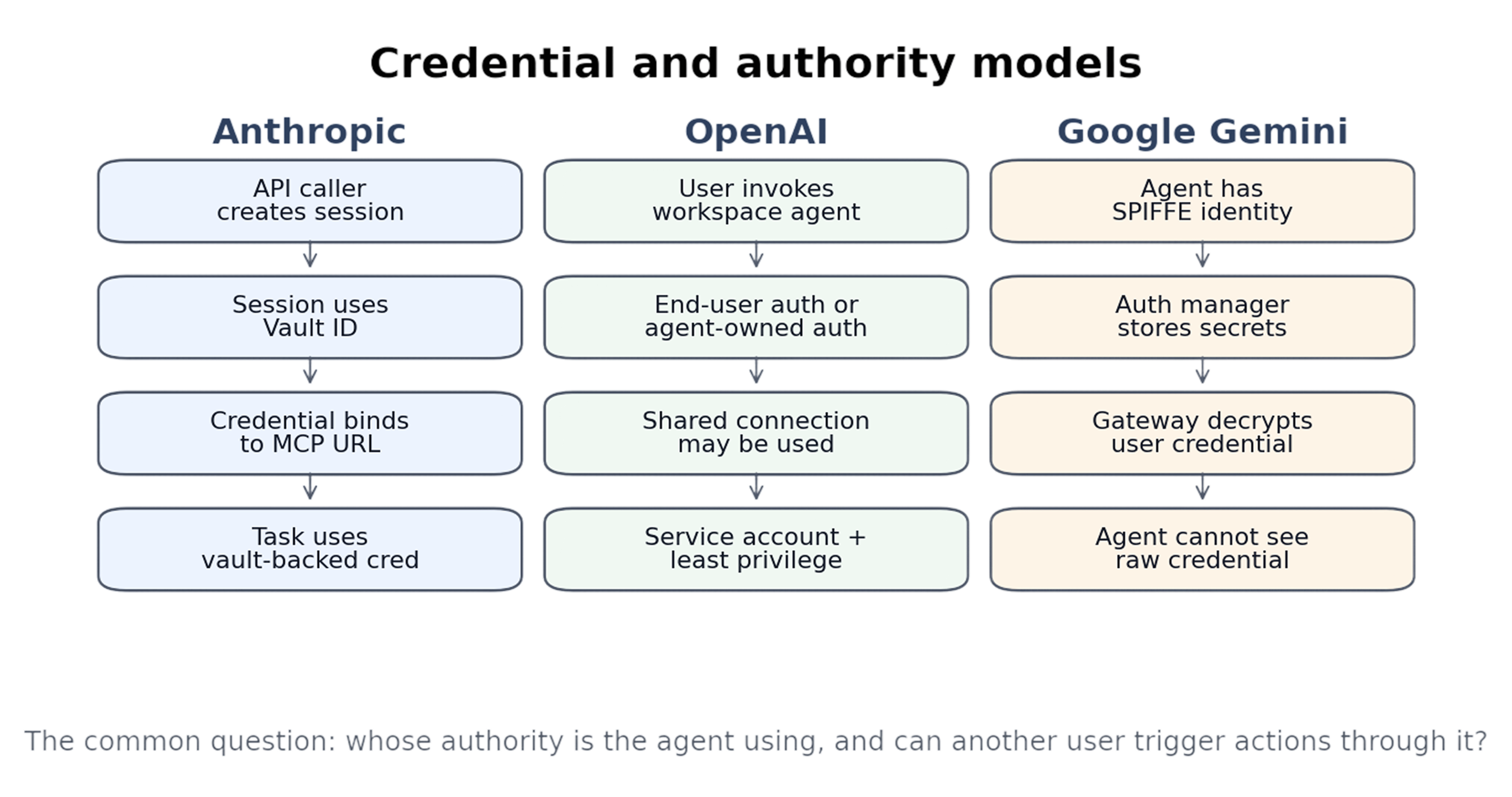
Figure 2. The core authority question is not “can the agent use a tool?” It is “whose authority does it use, and can others trigger it?” The Google flow shown applies when Agent Identity is used with Agent Gateway and Gemini Enterprise.
Anthropic
Anthropic Vaults let teams register third-party credentials once and reference them by ID at session creation. The docs state that vaults and credentials are workspace-scoped: any caller with API-key access to that workspace can reference them when starting a session, and revocation is performed by deleting the vault or credential. The engineering blog adds that OAuth tokens for custom tools can be stored in a secure vault and fetched by a dedicated proxy, rather than being exposed to the sandbox or harness [4].
The vault model has documented constraints worth a security reviewer’s attention. Each MCP server URL accepts only one active credential per vault: a second credential for the same URL returns 409. The mcp_server_url is immutable once created; repointing requires archiving and recreating. Vaults are capped at 20 credentials, matching the maximum MCP servers per agent. Secret fields (token, access_token, refresh_token, client_secret) are write-only and never returned in API responses. At runtime, credentials are re-resolved periodically during a session, so a rotation or archive propagates to running sessions without restart. Archiving a vault cascades to its credentials and purges secrets while retaining records for auditing [4].
OpenAI
OpenAI documents two app-authentication modes for Workspace Agents: end-user account, where each person running the agent authenticates with their own account, and agent-owned account, where the agent uses a shared connection. OpenAI recommends service accounts where possible for agent-owned accounts and warns that personal shared connections can let other users trigger actions through that connection, especially in Slack [8].
Two further details from the Help Center sharpen the OpenAI authority model. Slack deployment specifically requires shared (agent-owned) authentication for every connected app on the agent; an agent currently using personal connections cannot run in Slack until those connections are switched. Connector approval has three documented states, not two: write actions default to Always ask, and builders can relax specific actions to Never ask or set a custom approval policy. Naming the three states is what makes the approval posture reviewable per action [8].
Google Agent Identity is a strong identity primitive. Google documents a SPIFFE-based cryptographic identity for each agent, states that agent identities are not shared by multiple workloads by default, and says that when Agent Identity is used with Agent Gateway and Gemini Enterprise, end-user credentials are encrypted by the auth manager and decrypted at the gateway so the agent cannot access the raw credential. The Agent Identity auth manager itself is marked Preview [15].
The cryptographic mechanics behind that claim are concrete. Each agent is provisioned with an X.509 certificate valid for 24 hours that Google rotates automatically. Access tokens for Google Cloud are cryptographically bound to that certificate using DPoP, so a stolen token replayed from outside the trusted runtime fails the binding check. mTLS to Agent Gateway is enforced by a Google-managed Context-Aware Access policy that is on by default. The principal format used in IAM allow policies is principal://TRUST_DOMAIN/resources/SERVICE/RESOURCE_PATH; recognizing that format makes a policy line readable rather than opaque. One documented limitation: Cloud Storage legacy bucket roles (such as storage.legacyBucketReader) cannot be granted to agent identities [15].
4. Governance and policy enforcement
Anthropic
Anthropic’s governance model is mostly expressed through runtime and API primitives: agents, environments, sessions, vaults, Memory stores, permission policies, and events. This is a strong runtime-control model, but the public Managed Agents docs reviewed here focus less on centralized enterprise administration than OpenAI’s workspace RBAC or Google’s registry/gateway policy model. Broader Anthropic Administration API capabilities are out of scope for this Managed-Agents-specific audit.
OpenAI
OpenAI’s governance model is workspace-oriented. Workspace admins can control whether members can browse and run agents, build agents, publish agents to the workspace directory, and publish agents with personal or shared authenticated connections. OpenAI explicitly warns that publishing with personal connections can allow others to use an agent that authenticates with the builder’s account [8].
The Help Center treats publishing-with-personal-connections as a separate RBAC switch from agent publishing in general. Enabling it lets creators publish agents that use their own app or connector credentials, and OpenAI’s guidance is that anyone who can use such an agent may be able to access data or perform actions through those connections as the creator. The recommended posture is to keep the switch narrowly scoped, audit configurations regularly, and avoid sensitive or high-impact connectors on personally-authenticated published agents [8].
Google’s governance model is the most formalized. Gemini Enterprise Agent Platform includes Agent Registry, Agent Identity, Agent Gateway, governance policies, Model Armor, and Semantic Governance. Agent Gateway delegates access-control decisions to IAM, content sanitization to Model Armor, and context-aware controls to Semantic Governance [12][16][17].
Semantic Governance is the most distinctive of those layers and worth describing concretely. The docs frame it as an “intent gate” that intercepts proposed tool calls at the Agent Gateway before execution, evaluates them against natural-language constraints (up to 5,000 characters, scoped per-agent or per-tool), and returns one of three verdicts: ALLOW, DENY (with a human-readable rationale shown to the user), or ALLOW_IF_CONFIRMED (described as “Future”). The doc’s worked example: if a user asks to “summarize my calendar” and the agent attempts send_email, the policy detects the misalignment and rejects the call. Semantic Governance complements rather than replaces IAM, rate limits, and network controls [17].
5. Observability and investigation readiness
For managed agents, telemetry is not only operational data; it is the evidence trail for who asked the agent to do what, which tools were used, and under whose authority.
Anthropic
Anthropic’s session model is event-based. User events steer the agent, while session, span, and agent events provide observability into session state and agent progress. The event stream also supports tool-confirmation workflows and resuming idle sessions [5]. Anthropic memory stores add another audit surface: every memory mutation creates an immutable version that can be inspected or restored, with version history retained for 30 days by default [6].
The event surface is more reviewable than “event-based” suggests. Events follow a domain.action naming convention, so tool-confirmation flows show up as agent.tool_use or agent.mcp_tool_use paired with user.tool_confirmation events that carry result: "allow"|"deny" and an optional deny_message [5][21]. On memory, the redact endpoint is the compliance answer to a leaked secret in a memory store: it scrubs content out of a historical version while preserving who-did-what-when. The current head of a live memory cannot be redacted; the workflow is to write a new version (or delete the memory) first, then redact the old one [6].
OpenAI
OpenAI documents version history and agent analytics in the Workspace Agents help center [8]. Its launch post says the Compliance API gives admins visibility into each agent’s configuration, updates, and runs, and lets admins suspend agents if needed [7]. The broader Compliance API documentation says Enterprise customers can export logs and metadata from ChatGPT workspaces to eDiscovery, DLP, or SIEM tools [10].
Google documents metrics, traces, logs, topology, and tool-level views for Gemini Enterprise Agent Platform. The Observability tab includes dashboards for sessions, turns, invocations, token usage, latency percentiles, error rates, model performance, and external tool usage; traces expose step-by-step execution, and topology shows inbound and outbound dependencies. Agent Observability is marked Preview [18].
The dashboards are more granular than that summary suggests. Latency is reported at p50, p95, and p99. The Models view breaks out call counts, error rates, quota failures, and token usage per underlying foundation model. The Tools view exposes p95 latency, call counts, and error rates per external tool, plus the frequency of turns where no tool was called. Agent telemetry is emitted in OpenTelemetry format and exported to Google Cloud Observability, which is what makes it reachable from a SIEM rather than only from the console [18].
Defaults summary
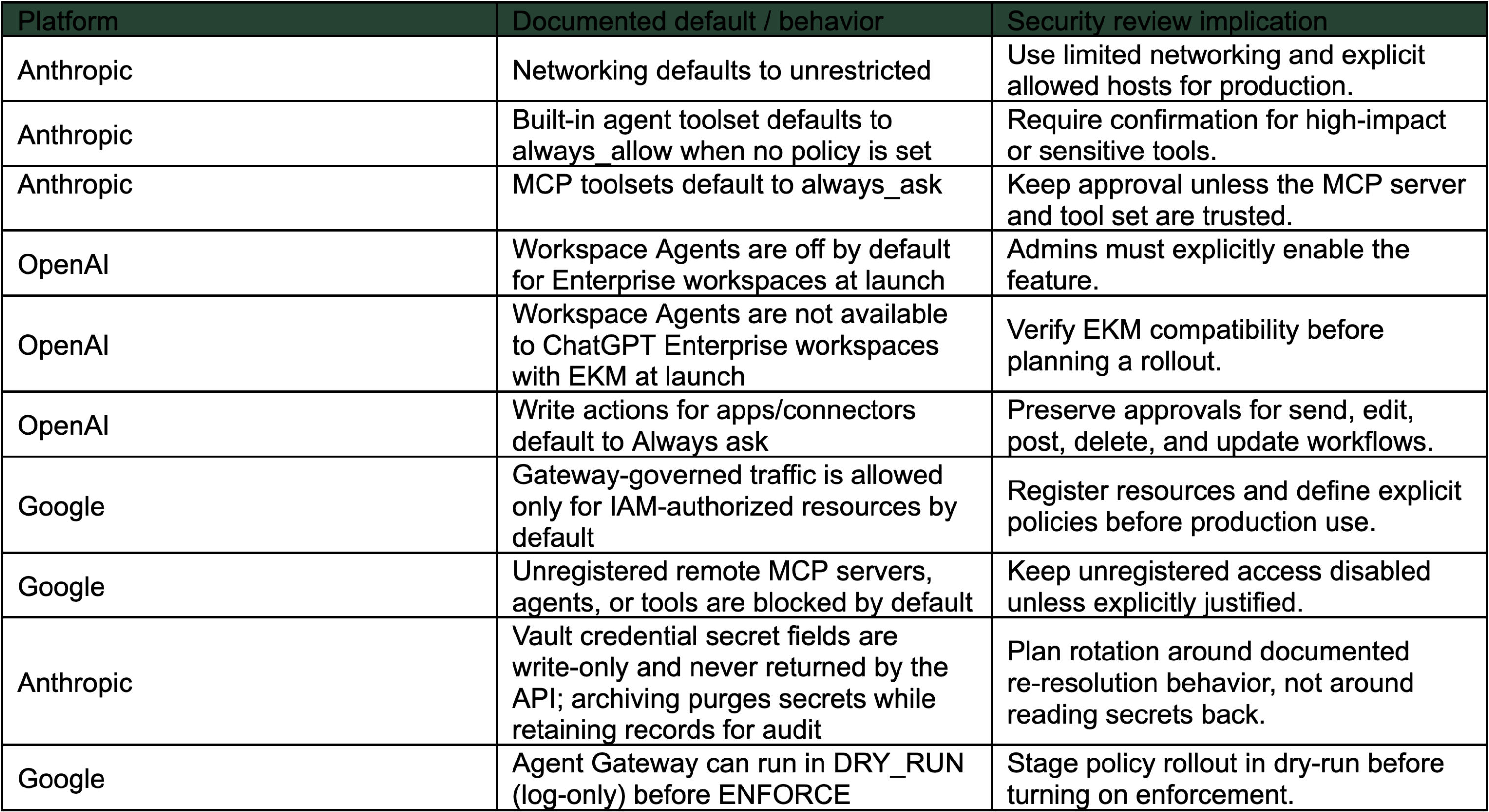
Many of the controls walked through above only matter in production if their defaults are right. Table 2 collects the documented defaults that matter before turning anything on, drawn from the sandboxing, egress, credential, governance, and observability sections of this audit.
PlatformDocumented default / behaviorSecurity review implicationAnthropicNetworking defaults to unrestrictedUse limited networking and explicit allowed hosts for production.AnthropicBuilt-in agent toolset defaults to always_allow when no policy is setRequire confirmation for high-impact or sensitive tools.AnthropicMCP toolsets default to always_askKeep approval unless the MCP server and tool set are trusted.OpenAIWorkspace Agents are off by default for Enterprise workspaces at launchAdmins must explicitly enable the feature.OpenAIWorkspace Agents are not available to ChatGPT Enterprise workspaces with EKM at launchVerify EKM compatibility before planning a rollout.OpenAIWrite actions for apps/connectors default to Always askPreserve approvals for send, edit, post, delete, and update workflows.GoogleGateway-governed traffic is allowed only for IAM-authorized resources by defaultRegister resources and define explicit policies before production use.GoogleUnregistered remote MCP servers, agents, or tools are blocked by defaultKeep unregistered access disabled unless explicitly justified.AnthropicVault credential secret fields are write-only and never returned by the API; archiving purges secrets while retaining records for auditPlan rotation around documented re-resolution behavior, not around reading secrets back.GoogleAgent Gateway can run in DRY_RUN (log-only) before ENFORCEStage policy rollout in dry-run before turning on enforcement.
The important caveat for Gemini is launch stage. The current docs mark Agent Gateway and Policies for Agent Gateway as Private Preview, Create IAM agent policies as Preview, Agent Registry as Preview, Agent Observability as Preview, and Agent Identity auth manager as Preview. Availability and support level should be verified against current docs before production [15][16][17][18].
For Anthropic, Permission policies govern server-executed tools only. Custom tools are executed by the customer application and are not governed by Managed Agents permission policies [21].
For Google, IAM allow policies for Agent Gateway egress can carry conditions written against MCP-protocol attributes: documented variables include
mcp.toolName, mcp.method, mcp.tool.isReadOnly, mcp.tool.isDestructive, mcp.tool.isIdempotent, mcp.tool.isOpenWorld, and request.auth.type.Policy can therefore restrict an agent to read-only operations on a tool, or block destructive methods specifically, rather than just allowing or denying the tool by name [24].
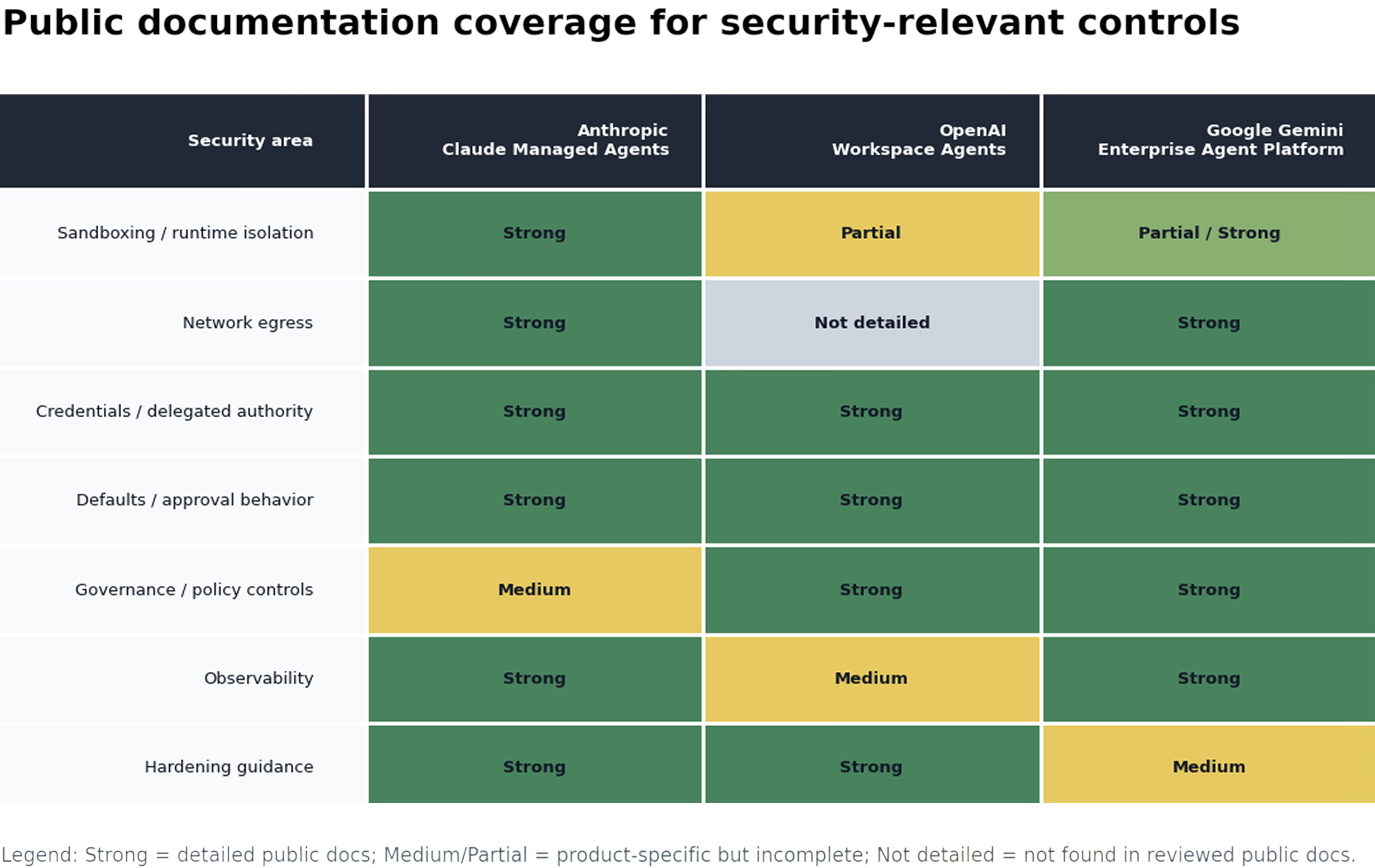
Figure 3. Public documentation coverage across the seven security areas covered by this audit. This is a map of what each vendor publicly documents, not a security score: the vertical axis lists the areas the audit walks through; the cells reflect the depth of public material in those areas.
Hardening checklist
- Runtime: Is there a documented sandbox boundary, and what state persists after the run?
- Egress: Can outbound access be restricted to approved hosts, apps, MCP servers, channels, or gateway-governed resources? Does the restriction also apply to server-side tools like
web_searchandweb_fetch, or only to container outbound traffic? - Credentials: Is the agent using personal credentials, end-user credentials, shared credentials, service accounts, vaults, or agent identity?
- Authority: Who can trigger the agent, and whose permissions are used when it acts?
- Approvals: Are write, send, post, delete, update, or destructive actions approved by default?
- Publishing: Who can share the agent privately, by link, in a directory, or in Slack?
- Policy: Are tools, MCP servers, apps, and endpoints centrally governed?
- Prompt injection: Can untrusted content affect memory, credentials, tool calls, or downstream actions? For Anthropic memory stores, should shared or reference memory be mounted read-only?
- Observability: Can the organization reconstruct user, agent, identity, tool, resource, output, approval, and failure events? Can audit history be redacted in place for compliance scrubs while preserving who-did-what-when?
- Kill switch: Can admins suspend the agent, revoke credentials, disable schedules, and remove integrations quickly?
Final view
The three platforms are converging on the same enterprise need: agents that can perform useful work with access to business context and tools. But their documented security boundaries are different. Figure 3 above maps where each vendor’s public documentation sits across the seven areas the audit walked through.
The practical lesson is simple: managed agents should be reviewed like privileged automation surfaces. The right security question is not just “is the model safe?” It is: what can this agent do, under whose authority, through which managed boundary, and with what evidence left behind?
References
[1] Anthropic Engineering, “Scaling Managed Agents: Decoupling the brain from the hands.”
[2] Anthropic Claude Managed Agents overview.
[3] Anthropic Managed Agents cloud environment setup.
[4] Anthropic Managed Agents vaults.
[5] Anthropic Managed Agents session event stream.
[6] Anthropic Managed Agents memory.
[7] OpenAI, “Introducing workspace agents in ChatGPT.”
[8] OpenAI Help Center, “ChatGPT Workspace Agents for Enterprise and Business.”
[9] OpenAI Help Center, “ChatGPT Agents App in Slack.”
[10] OpenAI Help Center, “Compliance API for Enterprise Customers.”
[11] ITPro, “Four things you need to know about OpenAI’s new workspace agents for ChatGPT.”
[12] Google Cloud, Gemini Enterprise Agent Platform overview.
[13] Google Cloud, Gemini Enterprise agents overview.
[14] Google Cloud, Agent Platform Code Execution.
[15] Google Cloud, Agent Identity overview.
[16] Google Cloud, Agent Gateway overview.
[17] Google Cloud, Semantic Governance policies.
[18] Google Cloud, Observability overview.
[19] TechTarget, “Gemini Enterprise Agent Platform adds connective tissue to Vertex AI.”
[20] ITPro, “Google expands Gemini Enterprise, consolidates Vertex AI services to simplify agent deployment.”
[21] Anthropic Managed Agents permission policies.
[22] OpenAI Codex enterprise admin setup.
[23] OpenAI Cookbook, “Building workspace agents in ChatGPT to complete repeatable, end-to-end work.”
[24] Google Cloud, Policies overview (Agent Platform).